Last time I talked about Visio and PowerShell and told you, in broad strokes, what I wanted to get done. Now we’ll actually get started.
Starting Visio from PowerShell
To open the Visio application from PowerShell in order to start manipulating it, you need to use the appropriate COM class. The code looks like this:
New-Object -ComObject Visio.Application
The New-Object cmdlet returns a reference to the new instance of Visio that’s running. If you ran that line by itself, you’d see a bunch of properties of the new Visio.Application object and you’d see that Visio started, but without putting the object in a variable you’d be kind of stuck. So...
$Visio=New-Object -ComObject Visio.Application
Now, we can use that reference to do fun stuff.
Opening a Visio Document
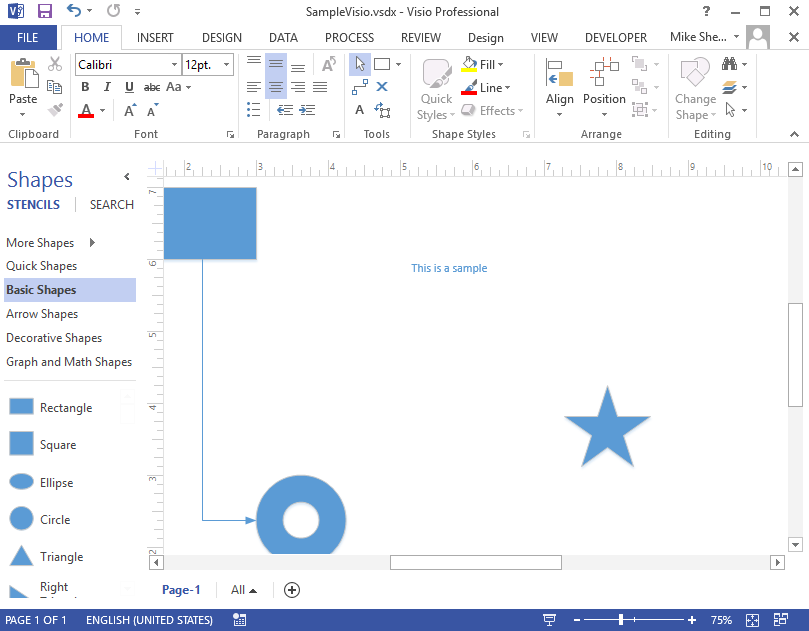
To open an existing document, use the Add method of the Documents property, a collection, of the $Visio object. Just like the last time, this outputs an object that we’ll want to capture. For example, opening the Visio diagram stored in c:\temp\SampleVisio.vsdx you’d do this:
$doc=$Visio.Documents.Add('c:\temp\SampleVisio.vsdx')
Documents are made of pages:
$doc.Pages | Select-Object -Property Name
This document only has one page, named by default, Page-1. We can either refer to it by name, $doc.Pages('Page-1'), or by number, $doc.Pages(1).
$page=$doc.Pages(1)
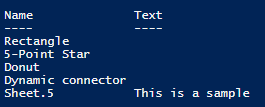
Once we’ve got the page, we can see the shapes that are found on the page:
$page.Shapes | Select-Object -Property Name,Text
Visio objects are interesting to work with, and the properties you want might be hard to find, but they’re probably there. For instance, to find the location, in the current unit of the document, of a shape you have to do this:
$x=$shape.Cells('PinX').ResultIU
$y=$shape.Cells('PinY').ResultIU
That should get you started looking at Visio with PowerShell. In the next post we'll work on dropping shapes on the page and connecting them.
A reference that will help immensely is the VBA Object Model reference for Visio found
here.
Let me know if you have questions about this.
--Mike